
What Wins is a powerful pattern discovery tool that analyses historical performance to find profitable betting angles. It calculates the "Impact Value" (IV) for every participant + condition combination in a race, helping you identify edges that have historically outperformed expectations.
Accessing What Wins
- Open any racecard and switch to the Form Expert view
- Click the What Wins button in the control bar
- Available for Basic tier and above
Understanding Impact Value (IV)
IV measures how much a participant outperforms random chance when specific conditions are met. It's calculated as:
| IV Score | Interpretation |
|---|---|
| 1.0x | Average - wins at exactly the expected rate |
| 1.5x | Good - wins 50% more often than expected |
| 2.0x | Strong - wins twice as often as expected |
| 3.0x+ | Exceptional - significant historical edge |
Filter Conditions
What Wins analyses 11 different filter combinations for each participant type:
| Filter | Description |
|---|---|
| Going | Same going as today's race |
| Class | Same class level (1-7) |
| Course | At this course specifically |
| Distance | Similar trip range |
| Field Size | Similar number of runners |
| Going + Class | Both conditions combined |
| Going + Distance | Going and trip range |
| Class + Distance | Class and trip range |
| Course + Distance | C&D combination |
| Going + Class + Distance | Three-way combination |
| All Conditions | All five filters combined |
Participant Type Pills
Toggle which participant types to show using the filter pills at the top:
| Pill | Participant Type |
|---|---|
| HOR | Horse - the horse's own historical record |
| TRN | Trainer - the trainer's record with all horses |
| JKY | Jockey - the jockey's record with all mounts |
| SIRE | Sire - the sire's progeny record |
| DAM | Dam - the dam's offspring record |
| DS | Damsire - the maternal grandsire's record |
| OWN | Owner - the owner's record with all horses |
Minimum Runs Filter
Use the "Min" dropdown to set a minimum sample size. Higher thresholds give more reliable results but may hide emerging patterns. Options:
- Off - Show all results (may include small samples)
- 5 - At least 5 runs (recommended starting point)
- 10 - At least 10 runs (good balance)
- 20 - At least 20 runs (high confidence)
- 50 - At least 50 runs (very high confidence)
Reading the Results
Results are grouped by horse and sorted by best IV. Each row shows:
- Type Badge - Which participant type (HOR/TRN/JKY etc.)
- Filter - Which condition combination was applied
- Participant Name - The specific horse/trainer/jockey etc.
- IV Score - The impact value (e.g., 2.50x)
- Sample - Runs and wins (e.g., 15R/6W)
Using Results Effectively
- Look for high IV (2.0x+) with decent sample size (10+ runs)
- Multiple strong patterns on one horse suggests real edge
- Be cautious of very high IV with tiny samples (e.g., 8.00x from 2R/2W)
- Course + Distance patterns often most predictive
- Trainer patterns reveal stable strengths/conditions
Apply Pattern to Form Expert
Click on any pattern row to instantly apply those filters in Form Expert:
- Click any row - The modal closes and Form Expert loads with matching filters
- Participant type - Automatically switches to Horse/Trainer/Jockey etc.
- Filters applied - Going, Class, Course, Distance, Field Size set to match the pattern
- Quick comparison - See how all runners in the race perform under those same conditions
This lets you validate a promising pattern by viewing the full Form Expert breakdown for all runners, making it easy to spot if the pattern horse truly stands out.
Pin & Close
Click "Pin & Close" to keep the What Wins results visible while browsing the racecard. The pinned results stay as you navigate between races. Click "Close" to dismiss.
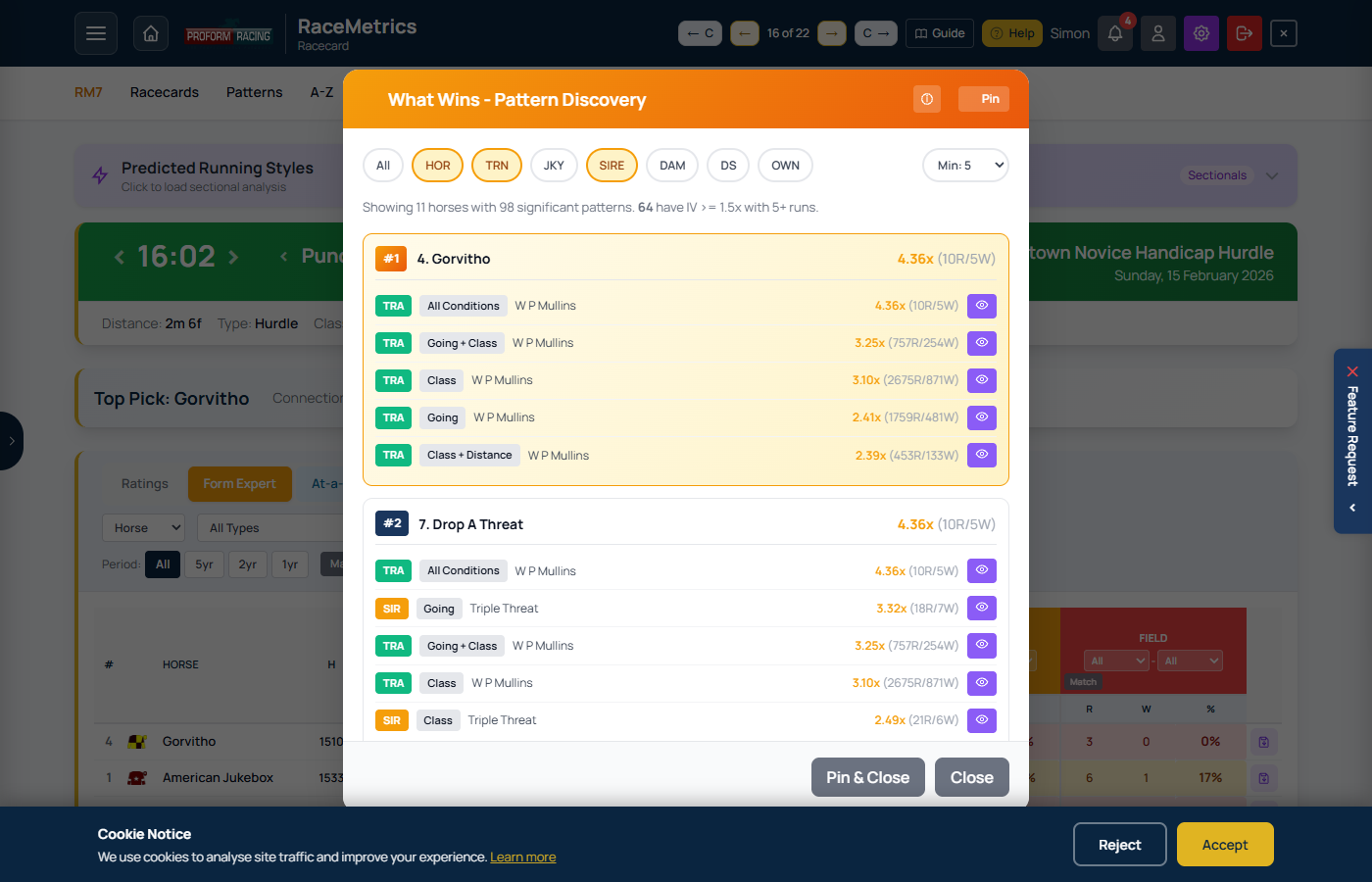
What Wins modal showing Impact Value analysis with participant + condition combinations ranked by performance