
Who can use it: Enterprise and above.
My Card is a fully customisable racecard tab. Instead of the fixed columns Ratings / Form Expert / At-a-Glance give you, you build your own layout from a library of 100+ columns sourced across every analytical tab — Main racecard, Form Stats, Ratings Analysis, Future Form, Draw & Pace, Trip Predictor, Predicted Running Styles, Collateral Form, Handicap and Market Movers — then drag-reorder, customise the form-line length, save the layout, and switch between layouts per race.
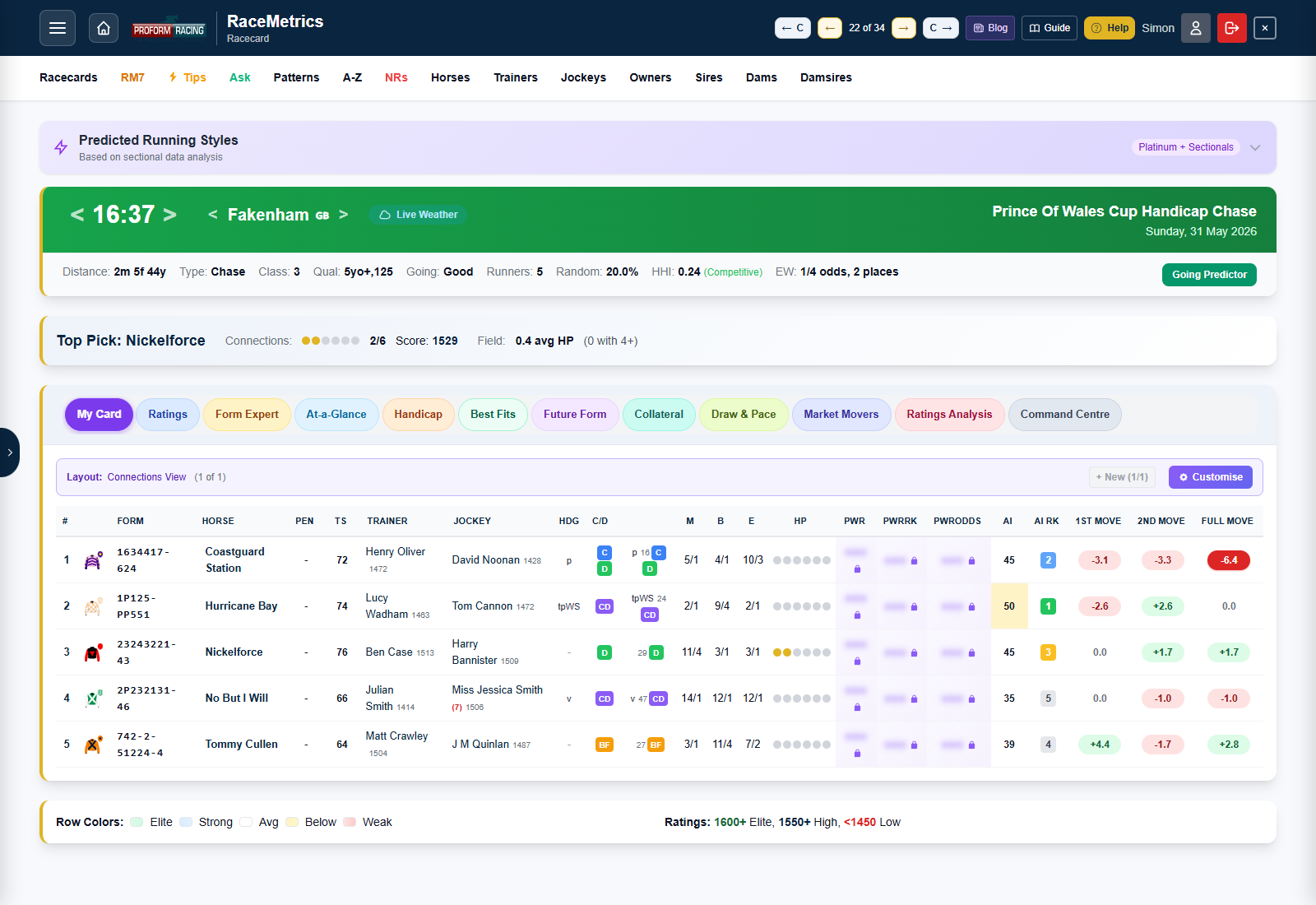
Opening the builder
From any racecard, switch to the My Card tab (first tab in the toggle bar) and click the Customise button on the layout banner. The full builder modal opens with the palette on the left and your active layout (the canvas) on the right.
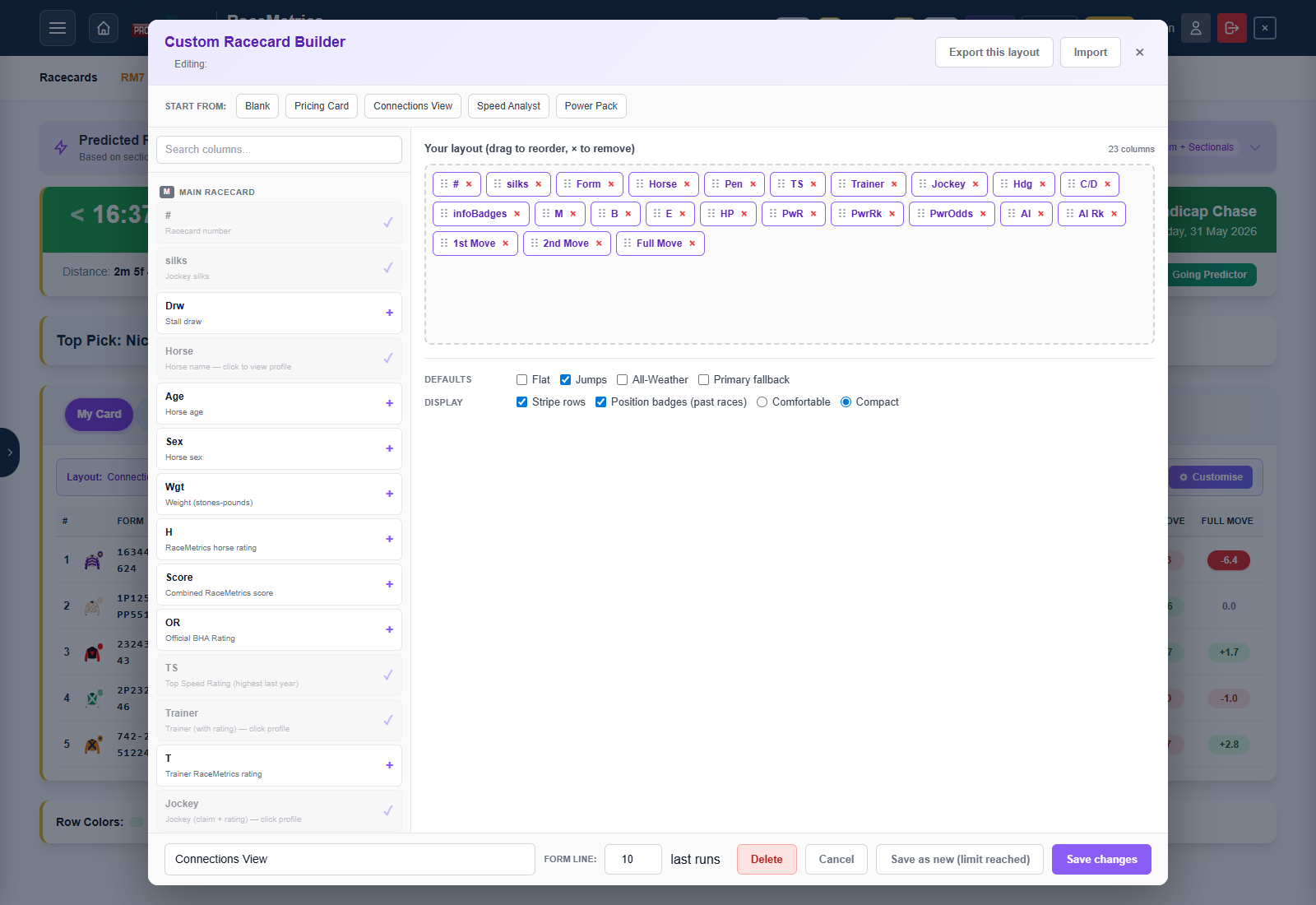
Picking columns
The palette is grouped by source — each chip in the column corner tells you where that field comes from:
| Chip | Group | What's in it |
|---|---|---|
| M | Main racecard | Card number, silks, horse, age, weight, ratings (Horse / Trainer / Jockey / Sire / Dam / Damsire / Owner), form string, prices (M / B / E), DSLR, course / distance wins, official BHA rating, top speed rating, AI Rating, AI Rank |
| FS | Form Stats | Point-in-time form stats from the System Builder engine, computed strictly from data before the race date — trainer form over the 14 days and 28 days before the race (runners / wins / strike rate / A/E), the same two windows for jockeys, runners since the trainer's last winner, trainer–jockey pairing record, sire progeny A/E against today's course, going and trip (each with the progeny runs and expected wins behind it), damsire career A/E, the horse's course / distance / going / class / career records, career A/E and PRB, ran-well %, last four speed figures, best and average 90-day speed, the average of its last five official ratings at today's code (OR Av5 — flat counts turf and all-weather together, chase and hurdle marks are kept apart, unrated runs skipped) with the five marks behind it (OR L5) and today's mark against that average (OR vs Av5), the jockey who rode last time out (LTO Jky) with today's jockey's RaceMetrics Rating minus theirs (J vs LTO — the jockey upgrade: +100 or more is a significant upgrade, blank when the same jockey rides again; the same figure as the System Builder's Jockey Rating Change vs LTO rule), and draw-bias A/E. It also carries the profile page's breakdown rows matched to today's race: the horse's PRB (average % of rivals beaten) at today's course, distance band, going and class, its PRB after a similar break (DSLR PRB — the same days-off band as today), and the yard's PRB with horses of the same recent activity (T PRB L3M — runners over the last five years that had the same number of runs in the previous 90 days as this horse), plus its PRB in today's season (Seas PRB) and calendar month (Mth PRB), after a similar journey to the track (Trav PRB), in today's field-size band (Fld PRB), at today's course direction (Dir PRB), under today's jockey (H/J PRB), and on ground that actually rode like today's forecast going (Gng(A) PRB) — each beside its run count. Travel and field-size bands are the System Builder's, so a figure here is one you can back-test directly; they differ slightly from the older bands on the profile page. The trainer and jockey pages' breakdown rows are there too, over the five years before the race and across all codes: the yard on today's day of the week (T SR% DoW and T PRB DoW), in today's season (T PRB Seas) and month (T PRB Mth) and at today's course (T PRB Crs), and the rider at today's course (J PRB Crs) and for today's trainer (J PRB T) — each beside its run count. The 14-day window is the classic "stable in form right now" yardstick; 28 days smooths out small yards. A dash means there is nothing to show — a debutant, or a horse with no previous run of that kind — while a genuine zero (a strike rate or PRB from runs that did happen) prints as 0.0%, so the two never look alike. Requires Proform Premium (these are the System Builder's own numbers) |
| RA | Ratings Analysis | 12 RaceMetrics composite ratings plus their within-race ranks: Power, Horse RA, Trainer RA, Jockey RA, Sire RA, Dam RA, Damsire RA, Owner RA, Combined RA, Future Form Score, Collateral Score, ISP / BSP / Finish for past races |
| FF | Future Form | FF Pts, sample size, opponents' PRB, opponents' win rate, opponents' best speed rating, own average PRB |
| D&P | Draw & Pace | Draw group (LOW/HIGH), Draw IV, pace style label, pace IV, tactical score, pace %s, matrix IV, Sweet/Dead zone badge |
| TP | Trip Predictor | Trip Fit (stars), trip score fraction (e.g. 2/3), trip trend, confidence level, optimal going / distance / class / surface / field size, peak age |
| PS | Predicted Running Styles | Predicted style badge (Front Runner / Prominent / Stalker / Mid-Division / Closer / Held Up), confidence, sample size, average early / late positions and percentages |
| CF | Collateral Form | Coll Advantage, Coll Disadvantage, Coll Even, Coll Net adjusted advantage, total shared data points |
| Hcp | Handicap | SF Frame chip + raw score + tier, SF All variants, ME chip + raw score + tier, Long-handicap badge, career OR range |
| MM | Market Movers | Eve / Bkf / Morn / BSP as Frac, Dec and Implied %, plus the four banded Move columns (1st / 2nd / Full / Race-day) |
Click any column in the palette to add it to your layout (the chip jumps to the canvas). Click it again to toggle it back off, or click the × on the chip in the canvas.
Type your own odds, ratings and notes straight onto the card
Three My Card fields are yours to write in, right on the racecard — upcoming races and past results alike:
- My Odds — a small entry box per runner. Type traditional fractions (
9/2) or decimals (4.5) — the box always shows the traditional fraction afterwards. The column heading shows your Book % as you go (the implied chances of your prices added up; 100% is a fair book). RM Pro / Proform Premium. - Book tick — whether a runner counts toward that Book %. Everyone is ticked except a reserve, which starts unticked so its price does not swell the book unless it actually gets a run; reserves also carry a small R before their card number. Tick or untick anyone — your choice is saved per runner and follows you across devices.
- My Rating — the same entry box for your own figure per runner (decimals fine). RM Pro / Proform Premium.
- My Notes — your note for a horse, shown as a quiet line running the full width of the card under the runner's row. Click the line (or the small pencil next to an un-noted horse's name, or the My Note column) to edit in place. Enterprise and above.
One note per race type. A horse can carry up to five notes: a General one plus one each for Flat Turf & NHF, Flat AW, Hurdle and Chase (hunter chases and cross-country count as Chase). A racecard shows the note for its own race type, falling back to the General note when there isn't one, and a small tag on the line tells you which you're reading. Writing a new note on a card files it under that card's race type by default — the pills in the editor let you file it as General or under another type instead. The horse's profile has a My Notes tab where all five sit together for editing.
Your noted horses that are running. On Runners A-Z, tick My notes beside the date to list only the horses you have written a note about, for the day you pick or every upcoming day; each one carries a small pencil (✎) beside its name, and hovering it (or pressing and holding on a phone) shows the note its card will show. The 9pm alerts email also has a Your noted horses running tomorrow section, with each horse's time, course, trainer, note and a link to the racecard, so you hear about a noted runner without looking. It comes with the Pattern Alerts email, switched on or off under Account → Email Preferences. Enterprise and above.
Breaks in form lines. Every form-lines table (racecard expansions, profile drill-downs, My Card print, the Trad RC pop-out) marks a layoff with a "149 days break" line between runs — on by default at the traditional 50 days. The Breaks button above any form-lines table switches the lines off and on, and the number of days is yours to set under Account → Preferences; both follow you across every device.
Data-change lines in form lines. The same tables mark the run where something first changed with a green line under it, the race-guide convention: "1st Time Cheek Pieces", "1st Time Visor", "1st Time Hood · 1st Time Tongue Tie", "1st Run Since Wind Surgery", and "Trainer change (from J Smith)" — shown only the first time the horse runs for that yard, so a horse moving between an Irish and a British record of the same trainer is not flagged on every crossing. When today's runner carries a change, a "Today: …" line sits above the first form line. Headgear first-time lines start from the feed's own numeral (the 1 in "p1") and are cross-checked against the horse's own history, so a declaration made before an intervening run can never show a false first time; a headgear change then reads down the form without opening each race. On by default; the Changes button above any form-lines table switches them off and on, and the tick lives under Account → Preferences beside the breaks setting. The Hd column still shows what was worn in every run.
Saving is invisible: press Enter or just click away and a small tick confirms it. Escape puts the old value back; emptying a box removes the entry. Nothing expands, nothing moves — the whole field stays on screen while you price all of them.
Typed odds live in a My Prices set and typed figures in a My Figures set, both created for you automatically on first use (they are My Ratings rating sets, so everything shows on every view, exports to CSV, and back-tests in the System Builder). You can also bulk-load either set from a spreadsheet via the My Ratings import — handy if you keep odds or ratings elsewhere, or are bringing notes and figures across from another service. Notes hold up to 1,000 characters each.
Reordering columns
In the canvas, drag any chip with its left-hand grip dots to reorder. The order on the canvas left-to-right is the order the columns will render in your table left-to-right. There's no theoretical limit on column count but mobile users will see horizontal scroll past about 12 columns.
Start-from presets
Four curated starter layouts sit across the top of the modal — click any to seed the canvas instantly:
- Pricing Card — ratings + form + prices, the classic compact view
- Connections View — all seven participant ratings (horse, trainer, jockey, owner, sire, dam, damsire)
- Speed Analyst — Official Rating + Top Speed + form + course / distance records + headgear
- Power Pack — the flagship cross-tab showcase — Power Rating, AI, Future Form Score, Collateral Score, Trip Fit, Predicted Style, Draw IV, Pace IV, Tactical Score
Form line length
The footer of the modal has a Form line input (1–10). My Card form strings show the horse's last N results from the data feed (which itself goes back 10). Year-break separators (the / in 234/56) are preserved when they fall inside your chosen window.
Naming, defaults and saving
Give your layout a name (e.g. "My Sprint Card") and tick any of the four Defaults checkboxes to make this the layout that auto-opens for that race type:
- Flat — turf flat races (race type 1)
- Jumps — Chase, Hurdle and NHF races (race types 3, 4, 5)
- All-Weather — AW races (race type 2)
- Primary fallback — used when none of the per-context defaults apply
Click Save changes to update the active layout in place, or Save as new to fork it into a fresh layout (auto-named "<original> (copy)" if you don't rename it).
Layout caps per tier
| Tier | Saved layouts | Behaviour |
|---|---|---|
| Enterprise | 1 | One layout slot — build the perfect one |
| Proform Premium | 10 | Build a different layout per race-type, plus a couple of experiments |
| Admin | 10 | Same as Premium |
| Below Enterprise | 0 | Tab visible but click triggers the upgrade prompt |
When you hit the cap, the + New button (in the layout banner) and the Save as new button (in the builder modal) both go disabled with a tooltip explaining the limit and an upgrade hint.
Switching between layouts
When you have more than one saved layout, the layout banner above the table shows a dropdown plus prev / next chevrons. Cycle through your layouts with the chevrons or pick directly from the dropdown. Mouse over the chevron to preview the next layout's name; the banner also shows (N of M) so you always know where you are in the rotation.
Freeze the first N columns
Wide layouts with 15+ columns scroll sideways on smaller screens. By default the identity columns at the left edge (Card #, Silks, Horse) scroll out of view as you slide the table sideways — you lose track of which row belongs to which horse. Freeze first N columns pins the leftmost N to the edge so they stay visible no matter how far right you scroll.
Open the builder, scroll to the Freeze row in the options pane, and pick 0 (off), 1, 2 or 3 columns. The frozen block gets a subtle separator line on its right edge so it reads as detached from the scrolling area. The most useful settings are 2 (Card # + Horse name) or 3 (Card # + Silks + Horse name) — whichever columns sit leftmost in your canvas are the ones that get frozen, so put your identity columns first.
Sticky header row
On long racecards (16+ runners) the column header row used to disappear off the top as you scrolled down. Now the headers stay pinned to the top of the scroll area so you can always tell which column is which without scrolling back up. No setting — on by default. Combined with the column freeze above, the top-left corner of the table holds its position against both scroll directions.
Mobile builder — three-tab view
On phones the builder collapses to a focused, full-screen three-tab layout so each pane gets the room it needs. The pill strip at the top picks the active tab:
- Add — the palette. Search and tap columns to add them to your layout.
- Layout (N) — your current layout as a vertical chip list with ◀ / ▶ reorder buttons and a × to remove. Touch-drag the handle to reorder; on an empty layout the tab surfaces the preset cards so you can start from a template.
- Settings — everything that used to crowd the footer on mobile: layout name, layout switcher, form-line length, default-for (Flat / Jumps / All-Weather / Primary), display options (stripes, badges, density), freeze first N columns, plus secondary actions (Save as new, Delete, Export this layout, Import).
The footer collapses to just Cancel and Save changes — the primary action takes the most thumb real-estate. Switching tabs has a short slide-in animation so the change of context registers. Tap + on a palette item and the Layout tab pulses briefly to confirm the chip landed.
New blank layouts open on the Layout tab with the preset cards visible; layouts that already have columns also open on Layout so you go straight to your chip list.
Premium-locked cells (blur)
A few columns are gated to Proform Premium even within My Card — specifically the three Power Rating columns (PwR, PwrRk, PwrOdds), the Form Stats group and Predicted Running Style fields. Enterprise users without Premium can still add those columns to a layout, but the cells render as blurred ••• placeholders with a tooltip and click-to-upgrade prompt. Layouts therefore stay shareable across tiers — export a layout containing Premium fields and import it as an Enterprise user; the Premium fields simply lock until they upgrade.
Import & Export
The builder header has Export this layout and Import buttons. Export downloads a JSON file containing the currently-edited layout only (filename includes the layout name slug + today's date). Import accepts the same JSON shape — useful for sharing layouts between users, backing up before a re-shuffle, or experimenting with a copy.
Inline form lines
Just like the Ratings and At-a-Glance tabs, clicking any horse row in My Card expands an inline form-line block underneath showing the runner's last 6 races with full per-race detail. Click again to collapse.
Printing your card
Your layout isn't just for the screen — you can put it on paper, or save it as a colour PDF, for a single race or a whole day's racing. On the My Card tab, click the Print button on the layout banner (right next to Customise). A modal opens with everything you need:
- Date — defaults to the day of the race you have open; switch it to any other day with upcoming races (past days can't be printed yet).
- Race picker — every meeting for that day, with a tick-box per race and a select-all tick-box per meeting. Tick just the open race for a one-race print, or sweep whole meetings for a full-day card (up to 40 races per print).
- Form lines per runner — None, 1, 2, 3, 5 or 10. Each runner's last N form lines print underneath the race table, in card order.
- Form or Sectional view — pick which form-line style prints. The sectional view includes the ROS (Run Out Speed) column and needs the Sectionals add-on.
Click Open print view and every selected race renders with your active layout on a print-optimised page, then the browser's print dialog opens automatically — pre-set to A4 landscape, small margins and full colour. Want a file rather than paper? Choose Save as PDF as the destination in that same dialog and you get a colour PDF of the identical pages.
A few things the print view handles for you:
- One race per page — each selected race starts on a fresh sheet.
- Anything wider than the page shrinks to fit — the card and the form lines are fitted separately, so wide form lines never shrink your card. An on-screen note says which part was shrunk and what you can change to print it bigger — the note itself never prints.
- Locked columns are dropped — any column your subscription can't see is left out of the print entirely rather than appearing blurred.
Printing is part of the Enterprise plan, so Enterprise and Proform Premium subscribers both have it. The Sectional form-line view additionally needs the Sectionals add-on — without it the option is shown but stays disabled.
Tier and access
My Card is an Enterprise feature. The tab button is visible to everyone but clicking it as a non-Enterprise user shows the inline upgrade card with a View Plans button (same pattern as Best Fits and Handicap). The Customise button and saved layouts are gated server-side as well.