
The main dashboard provides leaderboards for all seven profile types, showing the top performers ranked by RaceMetrics rating.
Navigation
Every page has a navigation bar just below the header. Everything is grouped into four menus — hover over each one (or tap it on mobile) to open it:
- Racecards: today's & upcoming cards, plus Runners A–Z, Non-Runners, Pattern Manager, Tips, Weather Centre, Going Predictor, Meeting Pace, Sectionals, AI Race Cards and Best Fits
- System Builder: the System Builder back-tester, Today's Qualifiers, Portfolio & Compare and Ask RaceMetrics
- Profiles: leaderboards for Horses, Trainers, Jockeys, Owners, Sires, Dams and Damsires
- RM7: the free weekly competition
On a phone the same menus sit in a bar fixed to the bottom of the screen (Racecards · Profiles · Build · RM7) — tap any one to open its list. The hamburger icon (top-left) also opens a full menu of every page.
Filtering Options
- Search: Find specific participants by name. Toggle between "Contains" (matches anywhere in name) or "Begins" (matches start of name) search modes
- Activity: Filter to participants with races in a recent period - 7, 14, 30, 90, or 365 days. Default is 90 days
- Min Races: Filter out participants with few runs (e.g., 10+, 50+, 100+, 500+). Options vary by profile type
- Type: Filter by Flat or Jumps racing (available for Trainers and Jockeys tabs only)
Stats Cards
Three summary cards appear above the leaderboard showing:
- Total: Number of participants matching current filters
- Highest: The top rating in the current leaderboard
- Average: Mean rating across all participants in the leaderboard
Biggest Movers
Each leaderboard tab shows the "Biggest Movers" - participants whose ratings have changed the most in the selected period. Controls include:
- Time Period: Select 7, 14, 28, 56, or 90 days
- Direction: Toggle between "In Form" (rising ratings) or "Out of Form" (falling ratings)
This helps identify rising stars with improving form, participants hitting a purple patch, or those experiencing a form dip.
Opening Profiles
Click any name in the leaderboard to open their detailed profile page with full statistics, charts, and analysis.
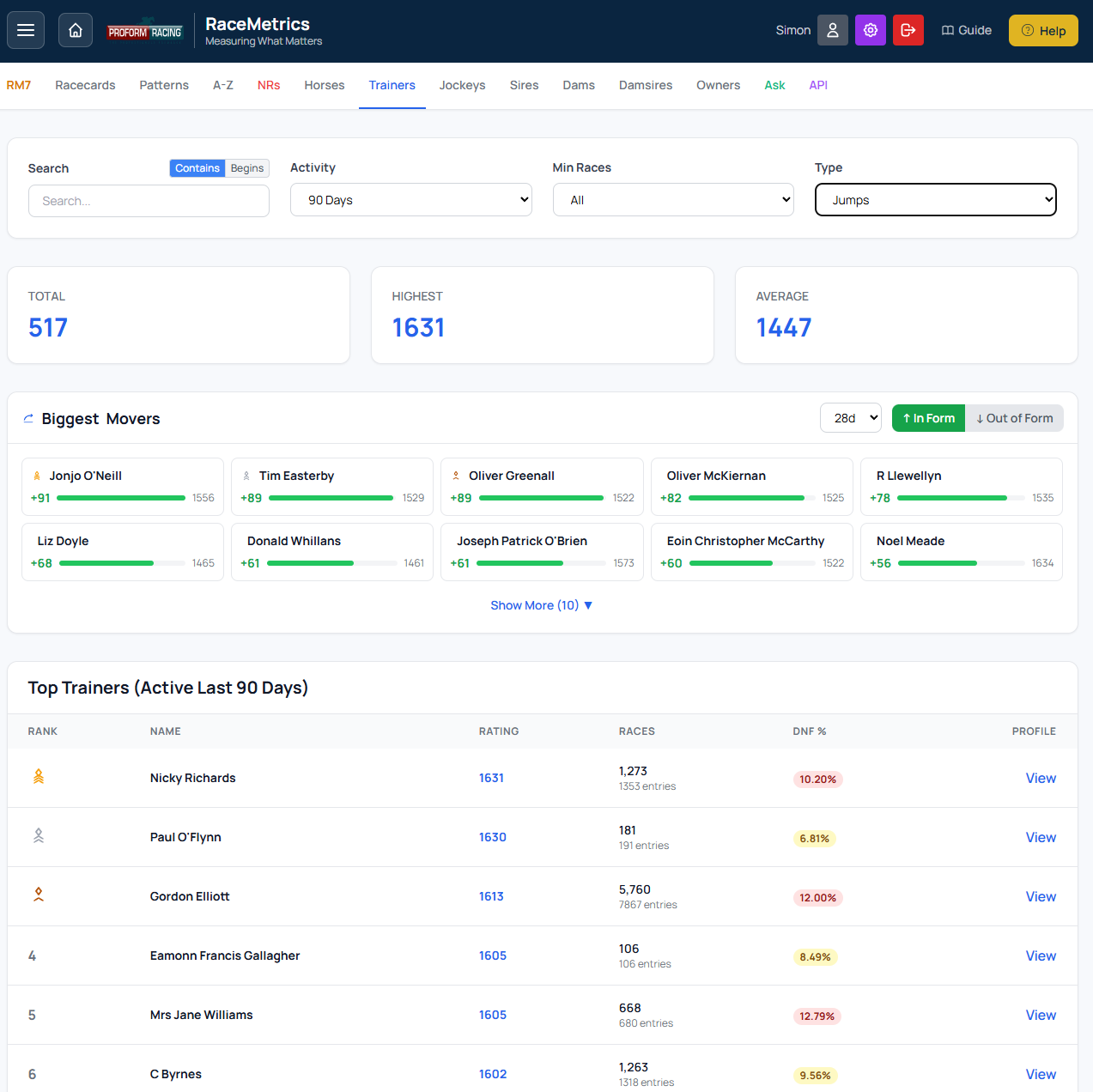
Dashboard showing leaderboard with filters, stats cards, and Biggest Movers section