
The Race Results page shows detailed results for completed races, including finishing positions and rating changes for all participants.
Accessing Race Results
- From Dashboard: On the dashboard's Racecards view, look for the teal date pills on the right side showing the last 5 days of results
- Calendar Picker: Click the calendar button to select any date back to January 2018
- From Profile Pages: Click any race row in the "Races" tab to view full results
- From Racecards: After a race has run, click the race to see results
Dashboard Results View
When viewing results from the dashboard:
- Teal date pills: The right side of the date bar shows the last 5 days with results available
- Race cards: Each card shows the race time, class, prize money, and the winner's name and SP
- Favourite indicator: An "F" appears next to the SP if the winner was the favourite
- Click any card: Opens the full race results page with detailed finishing positions and RaceMetrics Rating changes
Browsing Results from Results Page
When viewing a race result, use the hamburger menu (☰) to navigate to other results:
- Click the date header: Opens a calendar to pick any date with results
- Course sections: Shows all courses that raced on that date
- Time pills: Click any race time to jump to that result
- Current race: Highlighted in teal so you know where you are
Race Header
The amber header displays key race information:
- Time & Course: Race off-time and venue
- Race Name: Full race title
- Date: Day and date the race was run
Below the header, a grey bar shows: Distance, Type (Flat/NH), Class, Going, and number of Runners.
Three Tabs
The results page has three tabs:
- Full Results (default) — Detailed card-based view showing each runner with position, silks, beaten distance, jockey, trainer, in-running comment, and starting price
- Rating Changes — Compact table showing RaceMetrics rating changes for all 7 participant types (Horse, Trainer, Jockey, Sire, Dam, Damsire, Owner)
- Race Workout — Analyses how the race has worked out by tracking what all runners did in their subsequent races. See Race Workout for full details
Full Results Tab
Each runner is displayed as a card showing:
- Position: Finishing position with ordinal suffix (1st, 2nd, 3rd, etc.) — gold for 1st, silver for 2nd, bronze for 3rd. Non-finishers show PU, FE, UR, etc. in red
- Silks: Jockey colours
- Distance: Distance to next horse in lengths (nse = nose, shd = short head, hd = head, nk = neck, ½ = half length, etc.)
- Card No. (Draw): Racecard number and stall draw position
- Horse: Horse name (click to open profile)
- Age: Horse age in years
- Weight: Weight carried in stones-pounds (e.g. 9-7)
- SP: Starting price odds
- BSP: Betfair Starting Price as a decimal, with the Betfair place price underneath in brackets. Shown to every signed-in member on results back to January 2018
- Hi / Lo: The highest and lowest Betfair prices matched in running, with each shown underneath as a percentage against that runner's BSP. Negative (green) means it traded that much shorter than its starting price — a winner often reads −90% or more, while a beaten favourite that was never involved reads positive. A dash in the Hi slot means the horse drifted to Betfair's maximum price of 1000. RaceMetrics Pro / Proform Premium
- J: / T: Jockey and Trainer names (click to open profiles)
- Comment: In-running comment describing how the horse ran
Watch Replay
A green Watch Replay button beside the tabs opens the race video at At The Races or Racing TV, whichever holds the replay. It appears on results back to January 2018. (Viewing the replay itself is subject to the broadcaster's own access rules.)
Switching between the racecard and the result
A settled race links both ways in a single click: the result page has a View Racecard button beside the tabs, and a past racecard has a View Result button next to the Going Predictor.
Rating Changes Tab
The rating changes table shows all runners sorted by finishing position:
- Pos: Finishing position — 1st (gold), 2nd (silver), 3rd (bronze), or DNF statuses like PU (pulled up), FE (fell), UR (unseated rider)
- Silks: Jockey colours for visual identification
- Horse: Horse name — click to open profile
- H: Horse rating change (green for gains, red for losses)
- SP: Starting price odds
- Trainer / T: Trainer name and rating change
- Jockey / J: Jockey name and rating change
- Sire / S: Sire name and rating change
- Dam / D: Dam name and rating change
- Damsire / DS: Damsire name and rating change
- Owner / O: Owner name and rating change
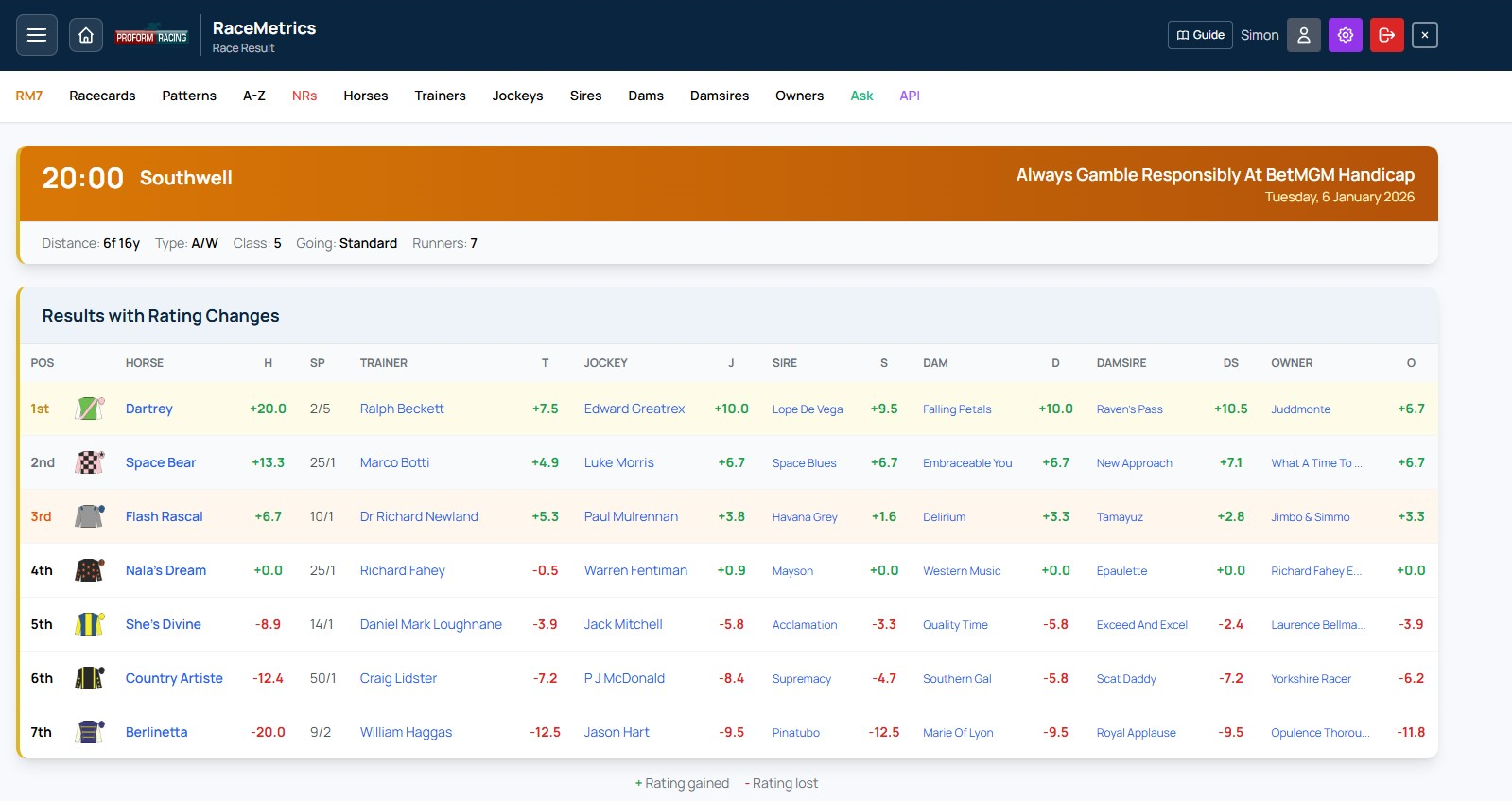
Race results showing finishing positions, SP, and rating changes for all 7 participant types
Rating Changes Explained
Each participant column shows how their RaceMetrics rating changed as a result of this race:
- +X.X (Green): Rating increased - performed above expectations
- -X.X (Red): Rating decreased - performed below expectations
- - No change or data unavailable
The winner typically gains the most points, with gains reducing for lower positions. Rating changes depend on the quality of opposition and pre-race expectations.
Row Highlighting
- Yellow tint: 1st place finisher
- Light grey: 2nd place finisher
- Light orange: 3rd place finisher
Non-Finishers
Horses that didn't complete the race show their status in red:
- PU: Pulled up by jockey
- FE: Fell
- UR: Unseated rider
- BD: Brought down
- RR: Refused to race
- DNF: Did not finish (other reasons)
Navigation
- Hamburger Menu: Access other races from the same day or different dates
- Recent Profiles: Click the left-edge tab to see recently viewed profiles
- Profile Links: Click any name (horse, trainer, jockey, etc.) to open their full profile
- Close: Use the X button in the header to close the results popup
Sectional Analysis (Proform Premium + Sectionals)
For races with sectional data available, a purple "Sectional Analysis" expandable section appears below the results. Click to expand and access:
- Sectional times at each furlong marker
- Speed percentages and positions
- Running style classifications
- Distance DNA on horse profiles — stride-cadence trip suitability vs winning horses at each distance
- "Full of running" flags — beaten horses that crossed the line with plenty left, badged on racecards until they run again
See the Sectionals section for full details on this feature.
View Racecard (Historical Analysis)
Click the View Racecard button in the results header to open the original racecard for this past race. This powerful feature lets you see exactly what the data looked like before the race was run:
- Pre-race ratings: All RaceMetrics scores (Horse, Trainer, Jockey, etc.) as they were before this race affected them
- Pace predictions: Predicted Running Styles based only on sectional data from races prior to this one
- Form Expert stats: All historical statistics use only data from before this race date
This is invaluable for:
- Reviewing analysis: See what information was available when you made your selections
- Understanding rating changes: Compare pre-race ratings with post-race results to see impact
- Learning from past races: Study historical patterns with authentic pre-race data