
Who can use it: everyone, including Free accounts.
Fast Results (Racecards menu → Fast Results, or racemetrics.co.uk/fast-results) puts every British and Irish result for today and yesterday on one page, published within minutes of each race finishing. It is free and open to everyone: you do not need an account.
How fast: over a full day's racing (9 October 2026, 47 races) a result reached the page a median of three minutes and twelve seconds after the off. The weigh-in, when the result is confirmed, came about seven minutes after that.
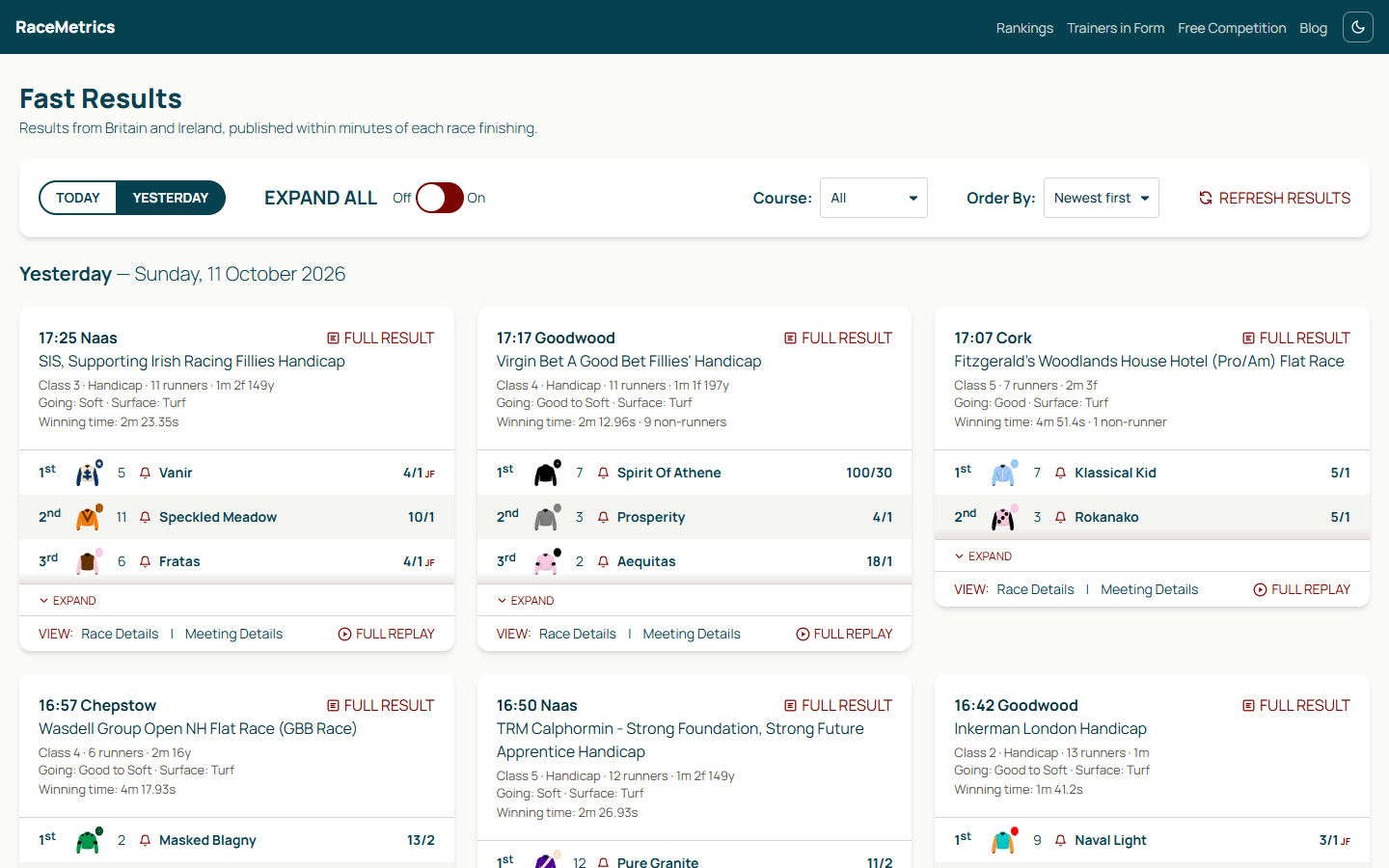
Fast Results on a wide screen: three races side by side, the first three home in each
What each race shows
- The first three home (more in a big field, down to the last place paid each way), each with its finishing position, silks, cloth number, name and starting price (SP). F marks the favourite and JF a joint favourite.
- The race: time, course and race name, then class, handicap or not, number of runners, distance, going, surface, the winning time and how many non-runners there were.
- Expand shows every runner in the order they finished; Collapse folds it back.
- Race Details: the winning trainer and jockey, how many ran, the distances between the horses, how far each was beaten by the winner, the winning owner, the winning time and the off time.
- Meeting Details: the going, the weather and the non-runners by name.
- Full Replay opens the race replay (usually on Racing TV) once the race has been run. Watching it is subject to the broadcaster's own access rules.
- Full Result appears top right once the official result has arrived overnight. It opens the race result page, with RaceMetrics Ratings and rating changes, Betfair Starting Prices and in-running comments, which needs you to be signed in. See Race Results.
- The bell beside a horse sets an alert for it: it saves a pattern on that horse in your Pattern Manager, so the horse is flagged whenever it runs again. A filled bell means you already follow it; click it again to stop. Signed out, the bell takes you to sign in first.
Provisional until weighed in
A race is marked Provisional from the moment the course files the result until the horses have weighed in. Until then the placings can still change, for example after a stewards' enquiry. If a placing is changed, the runner is marked (amended) rather than quietly corrected.
The fast result is never the official result. The official results file arrives overnight and replaces it, and RaceMetrics Ratings are only ever worked out from the official result.
The controls
- Today / Yesterday: the two days on the page.
- Expand all: one switch to open every race to its full field.
- Course: show one meeting only.
- Order By: newest race first (the default) or oldest first.
- Refresh Results: fetch the latest now. Today's page also refreshes itself every minute, and keeps the races you have opened open.
- Dark mode: the moon button in the top bar switches the page to dark, and the sun switches it back. The page starts light, and your choice is remembered in your browser.
Fits your screen
Each race is a card, and the cards fill the width you have: one column on a phone, two on a tablet or small laptop (from 640 pixels wide), three on a desktop (from 1300) and four on a very wide screen (from 1900).