
The Rating Comparison Chart lets you compare the rating history of multiple horses side-by-side on an interactive line chart. This is perfect for spotting improving or declining form trends across runners in a race.
Selecting Horses
- Use the checkboxes in the left column of the Ratings view to select horses
- Click the header checkbox to select or deselect all horses at once
- There is no limit to the number of horses you can compare
- 40 distinct colours are available for the lines
Chart Controls
- Last 10/20/50/All - Control how many races of history to display
- Rating / Score - Toggle between:
- Rating: Shows the horse's individual RaceMetrics rating history
- Score: Shows the weighted connection score history (see Score Mode below)
- Races Ago / By Date - Toggle between:
- Races Ago: Shows runs as relative positions (Latest, -1, -2, etc.) - good for comparing horses with different run frequencies
- By Date: Shows actual dates on x-axis - better for seeing timeline gaps
- Collapse/Expand - Click the chevron to collapse the chart panel
Score Mode
Score mode shows the weighted combination of all connection ratings at each historical run:
- Owner: 20%
- Trainer: 20%
- Jockey: 20%
- Dam: 18%
- Sire: 12%
- Damsire: 10%
The final point shows today's predictive score based on current connection ratings - useful for seeing how the support team compares to past runs.
Highlighting
- Click the eye icon next to a horse name to highlight that line
- Alternatively, click directly on a chart line to highlight it
- Click again or click empty space to clear the highlight
- When highlighted, other lines fade to make the selected horse's trend clearer
Chart Tooltip
Hover over any point on the chart to see detailed information:
- Date of the race (with days ago)
- Rating or Score after that race with the change (+/-)
- Course name, distance, and class
- Going conditions and race type (Flat/Hurdle/Chase etc.)
- Finishing position (e.g., 1st, 2nd, PU, etc.)
Legend Controls
- Click the coloured dot next to a horse name to temporarily hide/show that line
- Click the eye icon to highlight that horse's line
- Click the × button to remove a horse from comparison (unchecks the table checkbox)
- Click a horse name to open their profile page
Persistence
- Selections are saved per race - navigate away and return to see the same horses selected
- Settings (race limit, axis mode, chart mode) persist globally across all races
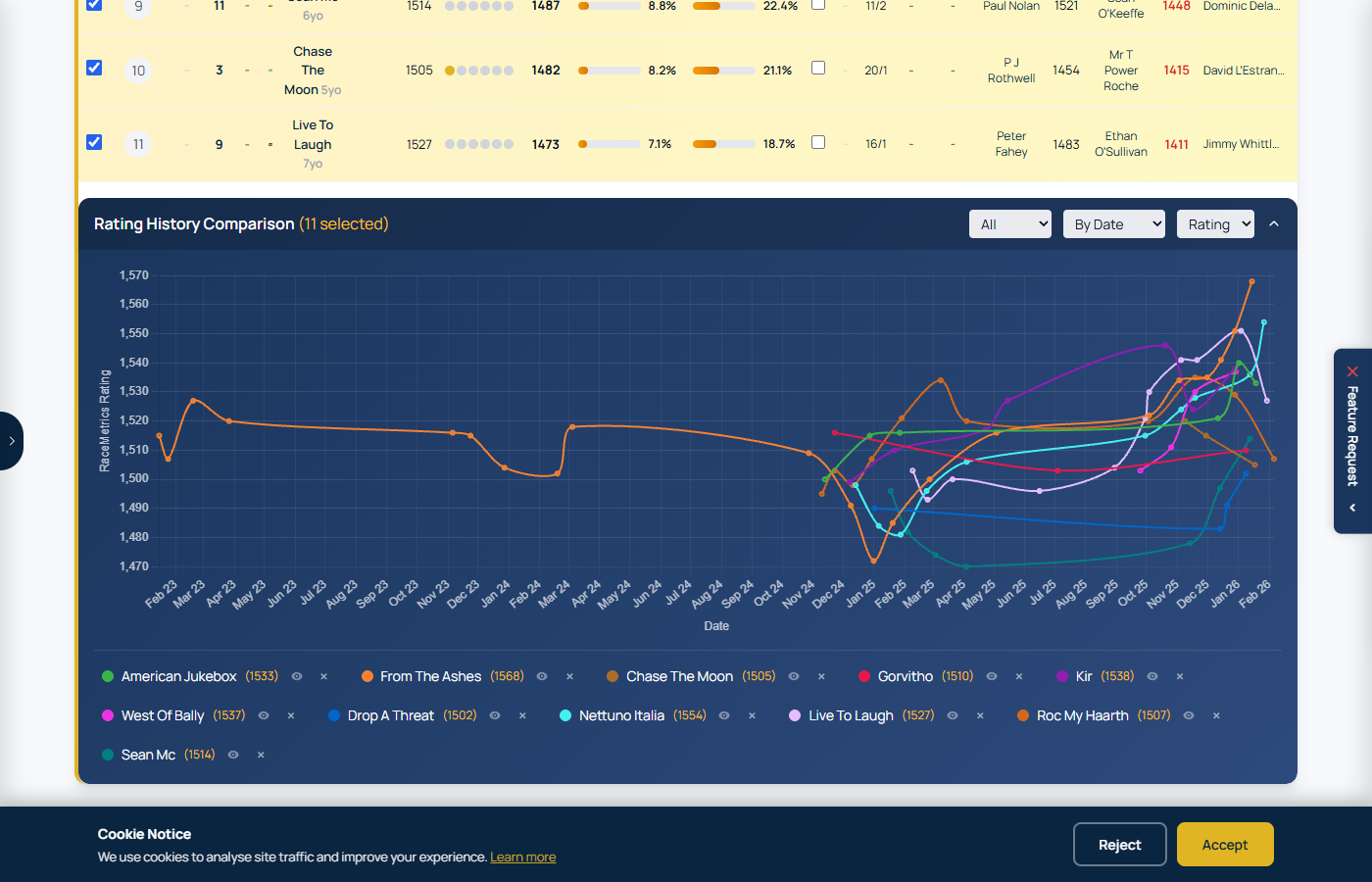
Rating Comparison Chart with multiple horses selected, showing rating trajectories over their last races