
When creating a new system, it can be difficult to find the name the correct name you are looking for, therefore in this software release we have added a search facility for any field where you see a magnifying glass 
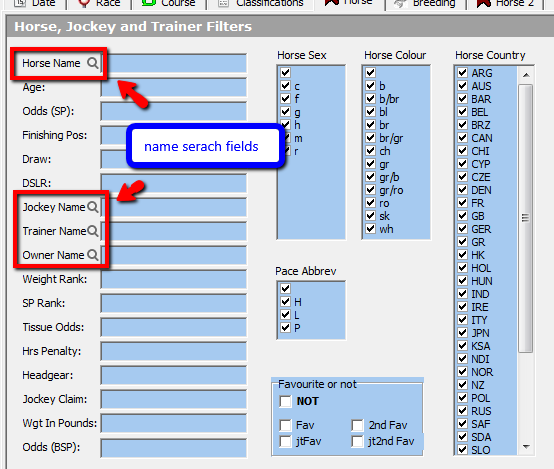
Name searches can be applied to the following fields in the system builder
- Horse, Trainer, Jockey, Dam, Sire, Damsire, Owner, LTO Trainer and LTO Jockey.
If you click on the magnifying glass Icon, the following dialog box will appear
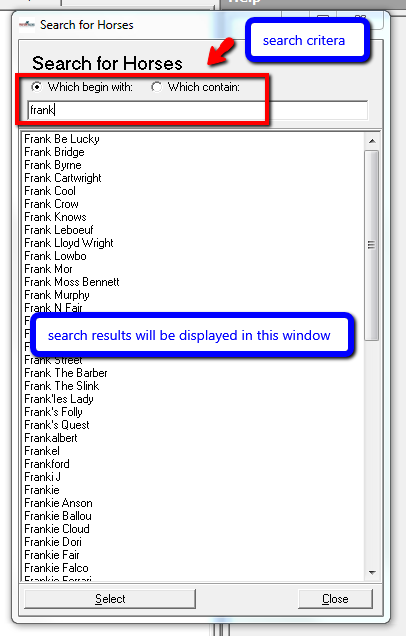
Similar to the full text search feature, you can search for items that begin with the letters you type or contain the letters you type by choosing the different option highlighted in the image above.
A full text search will start after you have typed at least 3 characters after which a list of all matches will be displayed.
If you find your match you can click it to select it and then press select at the bottom and the relevant field back in the system builder will be filled in by your selection and the search screen will close.
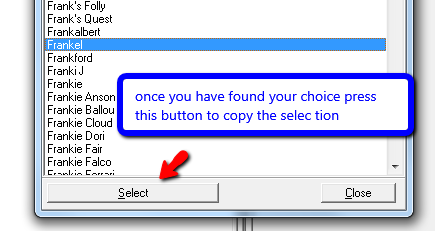
Or you can double click the one you want and the screen will close and the field in the system builder field will be populated with your selection.
Note: The screen is a dialog so you cannot use the rest of the software until you have either chosen a search result, pressed the close button or the ‘x’ in the top right hand corner of the dialog box.