
In this release we have added a notifications feature:
- When the results are available for download into the software.
- For non-runners and offical going changes.
- When the 24/48 hour declarations are available for download.
- When the race guides are available on our web site.
- When the power ratings are available for download into the software.
Every minute Proform checks for any new notifications which are displayed in the box with the most recent at the top and they are timestamped per the example below:
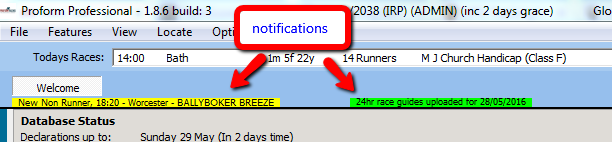
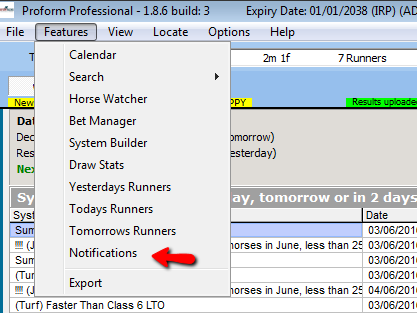
You can click on the yellow or green status lines to open the notification screen or you can also open this screen from a new feature button from the main menu or from the menus on the left.
When opened, the notifications screen looks like this:
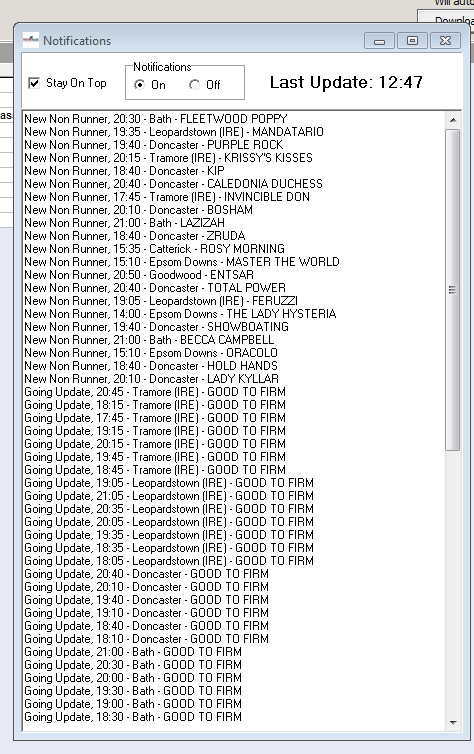
The window defaults to “Stay On Top” which you can alter when you open Proform however your choices are not saved so you will need to set your preference each time you open Proform.
If you untick stay on top and turn off notifications then the window will not display but notifications will still be shown on the main screen in yellow and green etc, you can click either notification type to bring the notifications box back up again.
- NOTE: Notifications don’t remove non-runners or change the going, you have to use the integrated non-runner tool to do this.