
Going Adjustments
We have always created going adjustments (GA) internally, which we use to create the Proform Speed Figures, however we have never released them, until now.
GA’s show you have much the ground on the day was speeding up or slowing down horses in seconds per mile.
A going adjustment of 0 would represent perfect Good ground in races on turf or perfect Standard ground on the a all-weather surface. We then have positive or negative GA’s to varying degrees.
GA Lookup Table
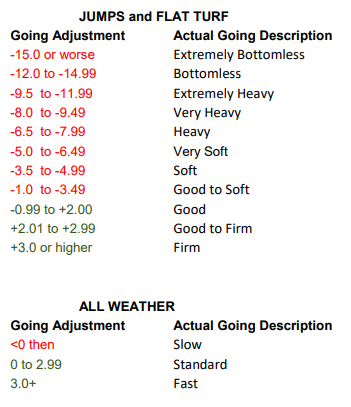
GA’s are very useful particular when the ground is extremely slow. You can see in the table we have the standard going descriptions ranging from Firm to Heavy and Fast to Slow but particularly in races on grass we four more going descriptions for when the ground is very bad.
There are some horses, sires, dams and damsires that only show their best when performing in demanding conditions and GA’s in Proform will allow you to find these horses on days when the ground is truly terrible.
So, what have we added to the Proform Software regarding GA’s?
System Builder
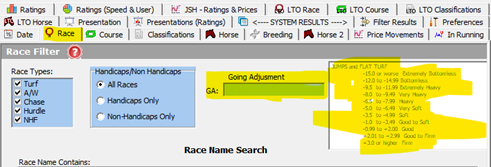
There is a new GA field in the system builder in the race tab.
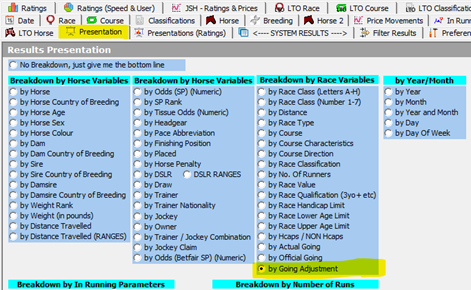
You can present by GA in the presentation screen in the system builder
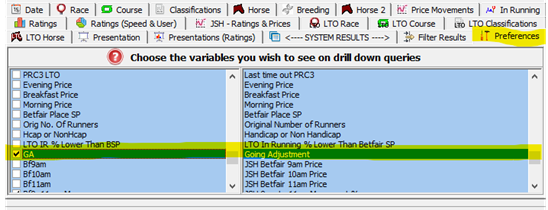
You can add GA to system builder drill downs in the system builder preferences tab, which means you use this for exporting GA’s.
Form Book
When viewing a result in the form book dataview the actual going and GA are show in the header

Horse Form
When viewing a horses form a column for GA was added.
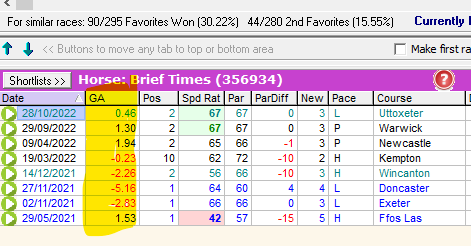
NOTE: The new field will be at the very right-hand side of the fields, you may need to scroll sideways to find it. You can then move it where you wish etc.
Prior Form
GA is added to prior form screen.
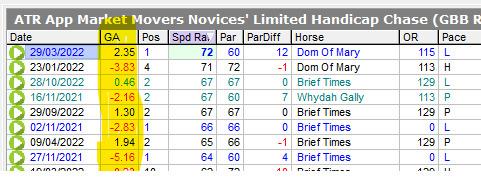
NOTE: The new field will be at the very right-hand side of the fields, you may need to scroll sideways to find it. You can then move it where you wish etc.
Calendar
When viewing the calendar for a past days racing the GA is shown with lots more new fields.

GA has been added to the form book main filters screen on the race related filters tab.
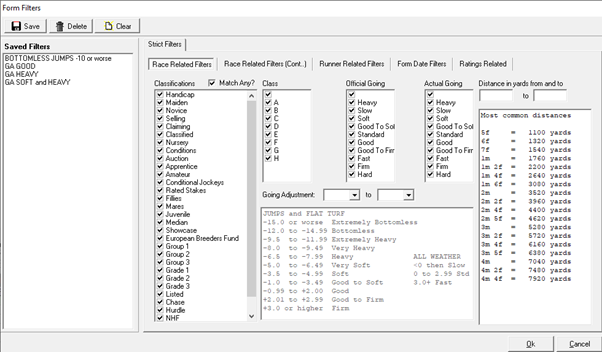
This means you can create any number of filters to quickly filter form in the form book using GA’s.
To refresh yourself on how filters work visit this help link.
We have also changed the distance filters to yards on the same screen. This is because the old method contains a bug when new distances were introduced which meant filters kept breaking.
By using yards instead this fixes that issue.