
The short version
- Your note under every runner. Up to five notes per horse (a General note and one per race type), typed straight onto the card or on the horse's profile, and kept against the horse for good rather than expiring with the race.
- Price the race yourself. Type a fraction or a decimal beside each runner; it shows as the fraction, a running book total builds under the heading, and reserves start outside the book until you tick them in.
- Your own rating in the next box. Saved as a rating set, so it follows the horse onto every view and exports to a spreadsheet.
- Breaks and first-time changes as their own lines in the form. A layoff shows as a line between runs; first-time headgear, a breathing operation or a new yard shows in green, and today's change sits above the first run.
- Rate the winner, and the field is worked out for you on your own pounds-per-length scale, with weight-for-age and weight carried handled, edited any time and re-derived for every race. Winner sheets import back to January 2018.
- One account, every device. The same card opens on your phone, tablet and desk, and every set of your figures back-tests in the System Builder.
A lot of experienced form students have a method of their own: a notebook of comments on horses, a habit of pricing the race up before looking at the market, a private set of figures built by rating the winner and working the rest of the field out from it. For years that routine lived in a notebook, a spreadsheet, or a program on one machine.
Over the last fortnight we have built all of it into RaceMetrics, in the browser, on the card you already use: the notes, the prices, the ratings, kept for good and available on whatever device is in your hand. Same idea, your method. This is a walk through what you can do, with the screens as they are today.
The morning card
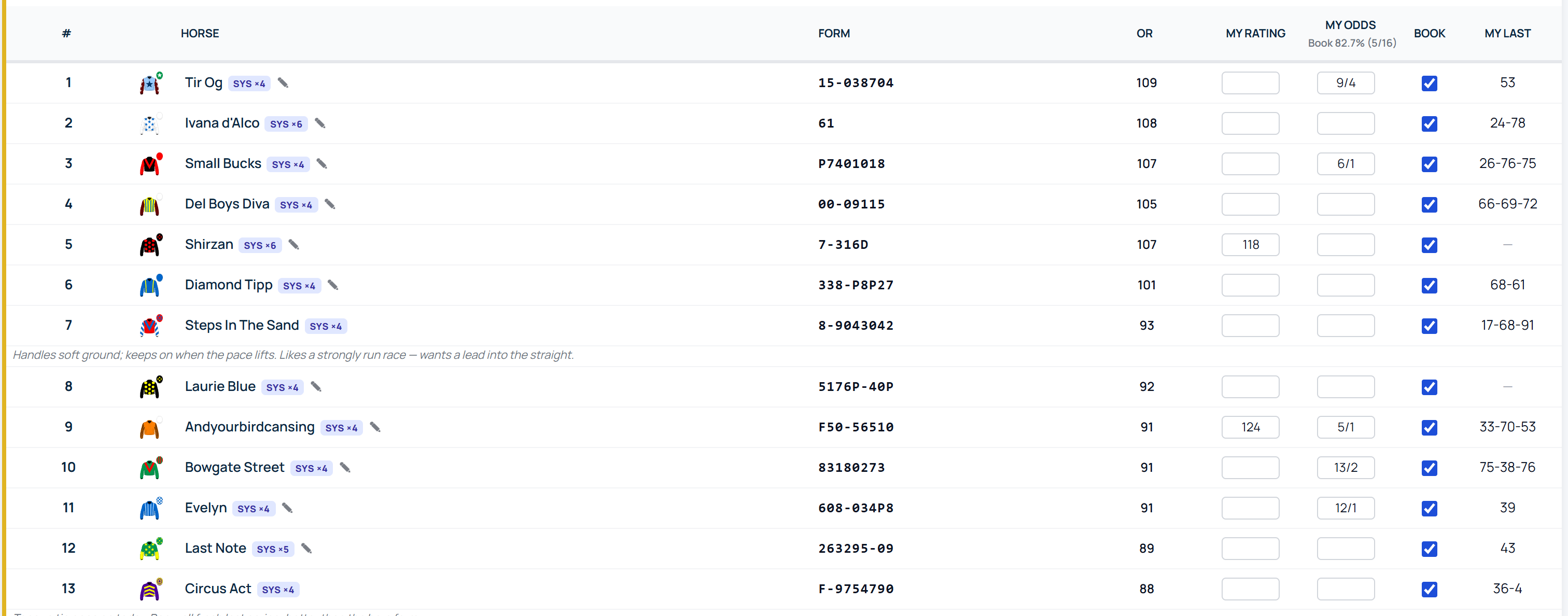
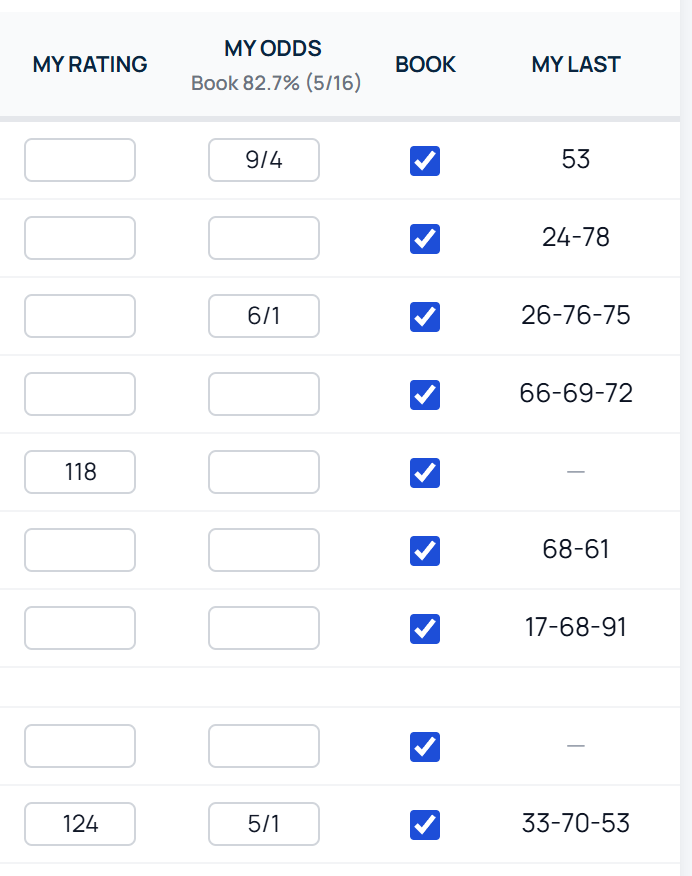
My Card is a racecard built from your own columns. The one below carries the form string, the official rating (OR) and then three columns that are yours to write in: your rating, your price and a Book tick. Every runner is a single compact row, so the whole field fits on one screen, and the card looks the same on a phone as it does on a desk.
Price the race yourself, with a running book
Type a price beside a runner the way you would say it, a fraction such as 9/4 or a decimal such as 7.5, and press Enter. It is saved and shown as the traditional fraction, and nothing on the card moves, so you can price the whole field without leaving the page. Under the My Odds heading the book builds as you go, with a count of how many runners you have priced. Once the total tops a full book the excess is your margin; short of it, there is still value to find somewhere.
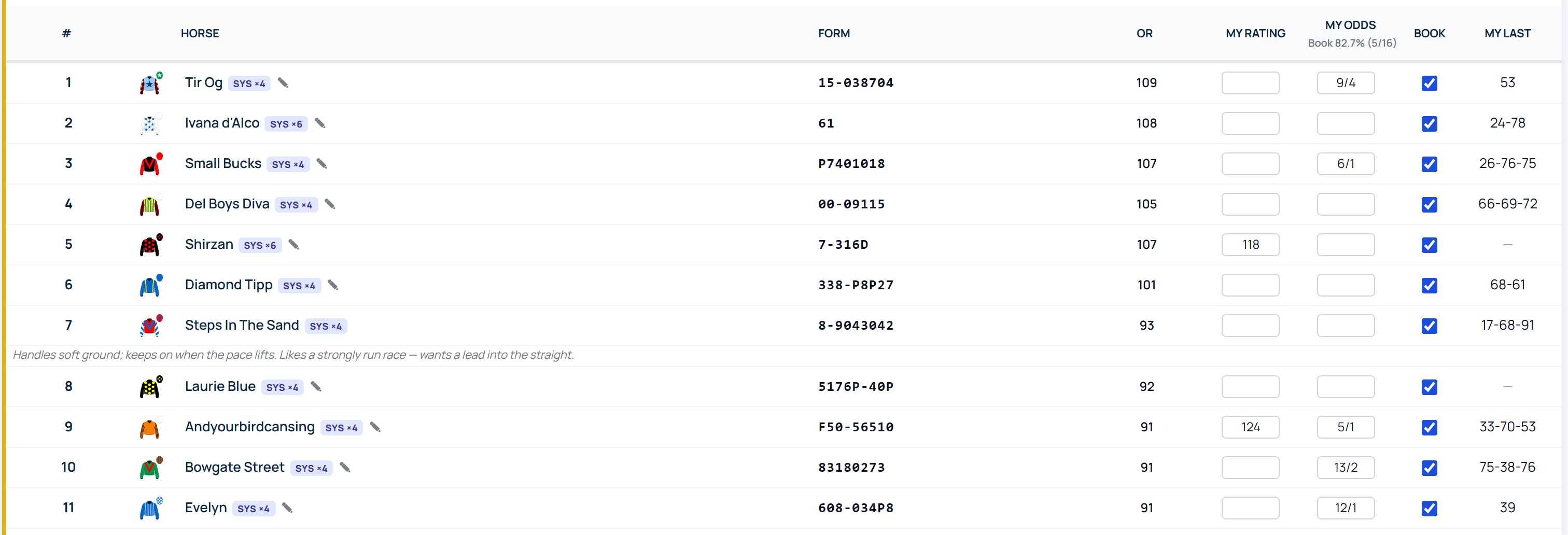
Reserves are handled the way a pricer would want. A reserve carries a small R before its number and starts outside your book, so its price cannot swell the total unless it actually gets a run. The moment it is confirmed, tick the Book box; that tick is remembered on every device you use. The same tick lets you drop any runner from the book, reserve or not.

Your own rating, saved as a set
The box beside the price takes your own figure, decimals if you like. Figures and prices are stored as rating sets of their own, which means they behave like every other set on RaceMetrics: they appear on the racecard, At-a-Glance, the Form Expert, the A to Z and the horse's profile, they export to a spreadsheet, and they can be tested in the System Builder.
Notes that stay with the horse
Under each runner sits your note, running the full width of the card. Click the pencil, write, click away. The note is saved against the horse, not the race, so it is still there the next time that horse runs, this season or three seasons from now. Notes take up to a thousand characters.

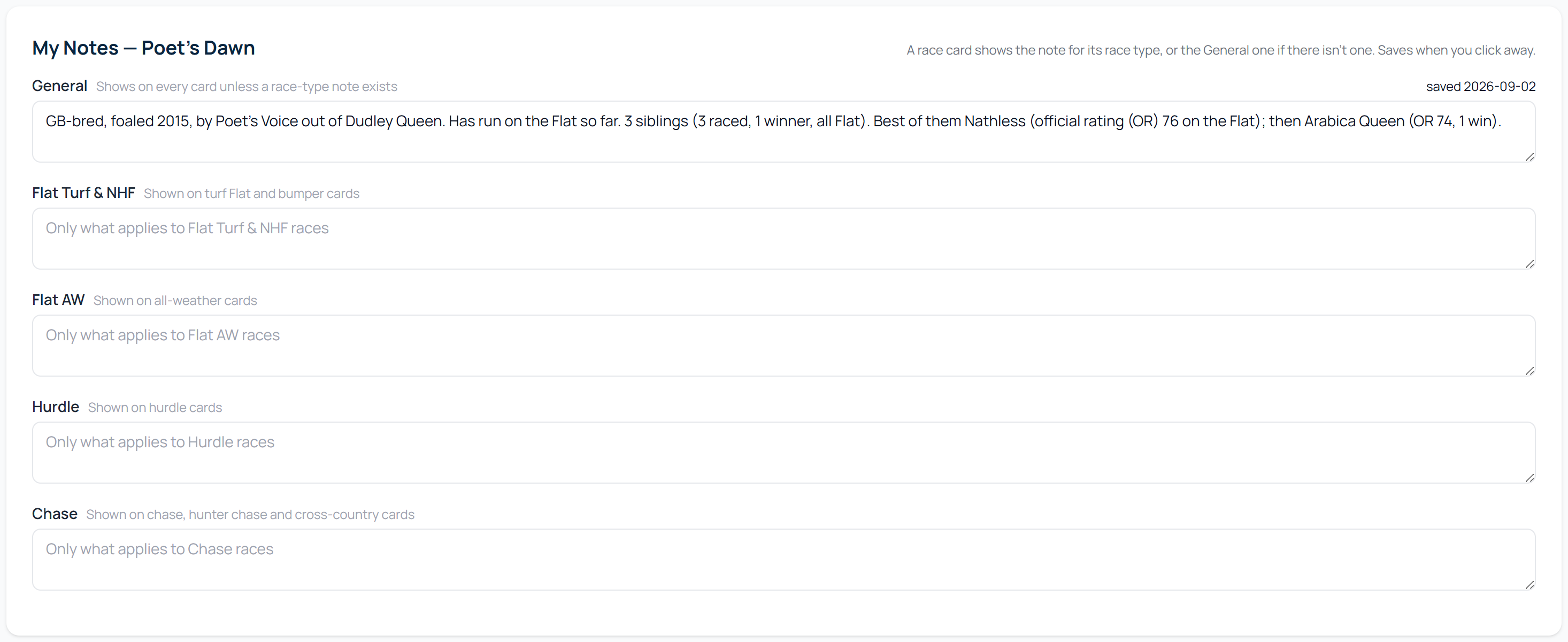
If you keep separate comments by discipline, the horse's profile has a My Notes tab with five boxes: a General note and one each for Flat, All-Weather, Hurdle and Chase. A card shows the note for its own race type and falls back to General, so if you prefer one note per horse, that works exactly as before.
Breaks and first-time changes, in the form lines
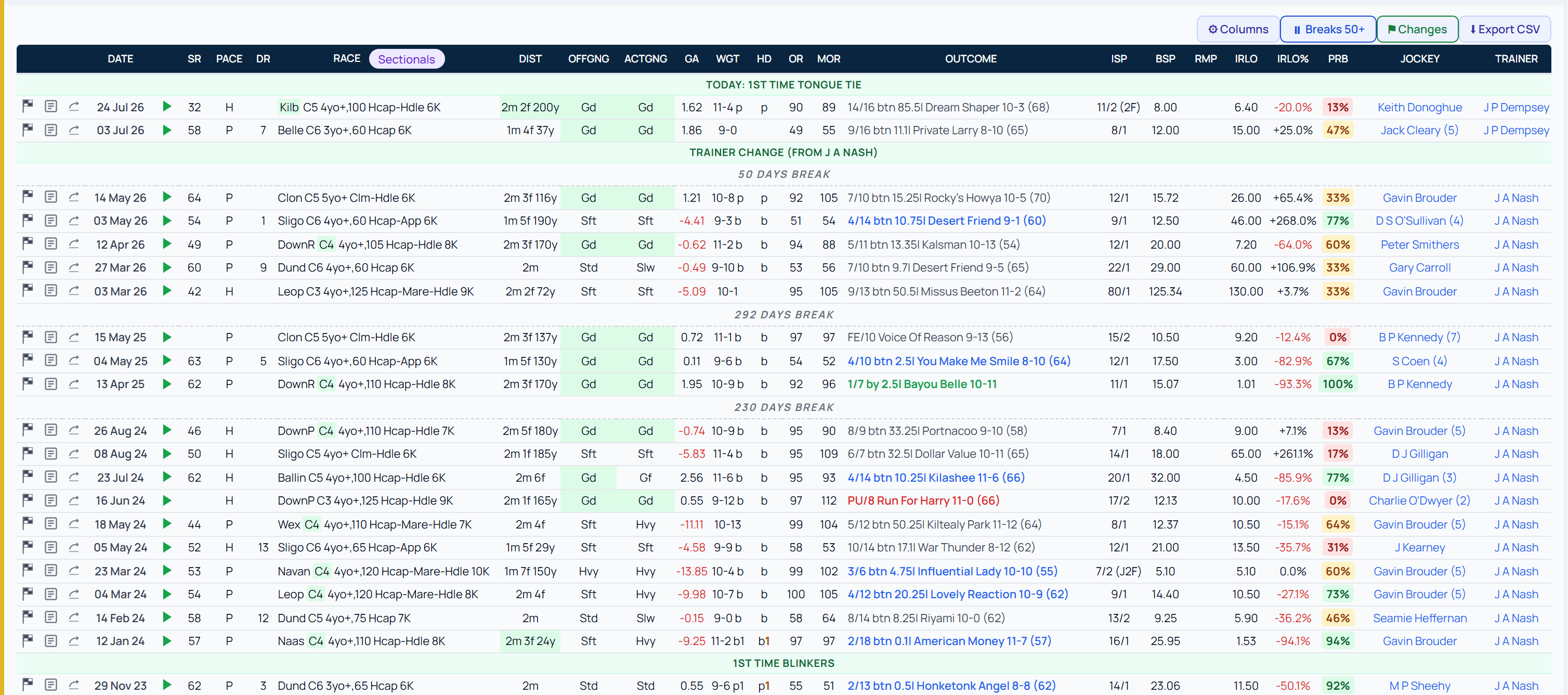
Open the form under any runner and a layoff shows as its own line between the runs. How many days counts as a break is yours to set (Account, then Preferences; the default is 50), and the Breaks button on the table switches the lines off if you would rather have the form clean.
The green lines mark the run where something changed for the first time: headgear, a breathing operation, a new yard. When today's runner is the one carrying the change, it sits above the first line, so you are never caught out at the off. A separate Hd column carries the headgear worn in each run.
The family, in one look
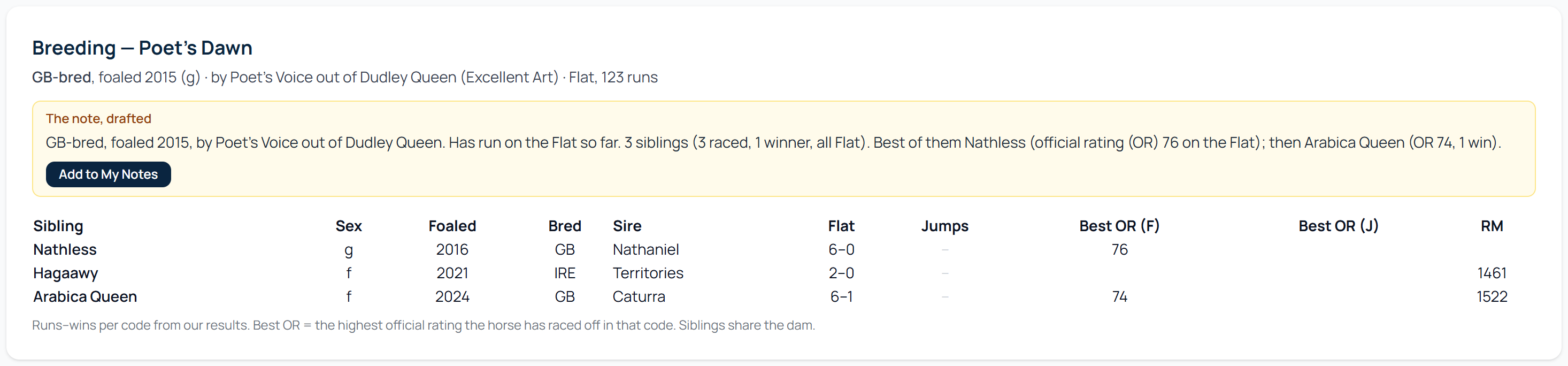
Many form students write a breeding line when they first meet a horse: where it was bred, by whom, out of whom, and whether the siblings could run. The Breeding tab on the horse's profile puts that in one table: every sibling with its sex, year, whether it ran on the flat or over jumps, its wins and its best official rating. Above the table the plain-English version is drafted for you, and one click adds it to the horse's General note.
Rate the winner; the rest is worked out
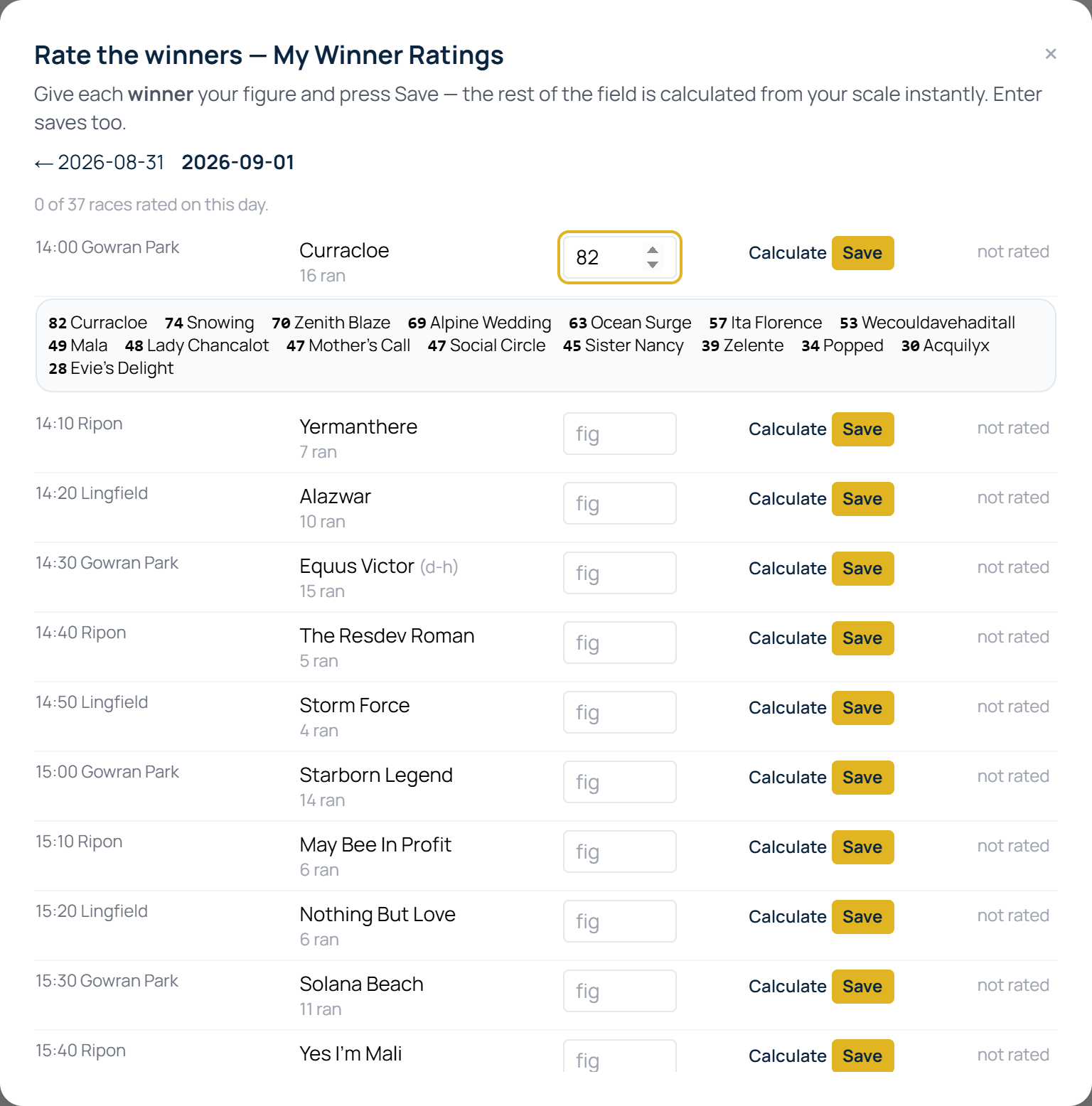
If your method is to rate the winner and work the beaten horses out from it, that routine is now in My Ratings. Choose rate yesterday and the day is laid out race by race, every winner already named, with one box beside it. Type your figure for the winner, press Calculate, and every beaten horse is derived on your own pounds-per-length scale: the weight it carried against the winner, the lengths it was beaten, whole numbers throughout, and the winner kept exactly as you typed it.
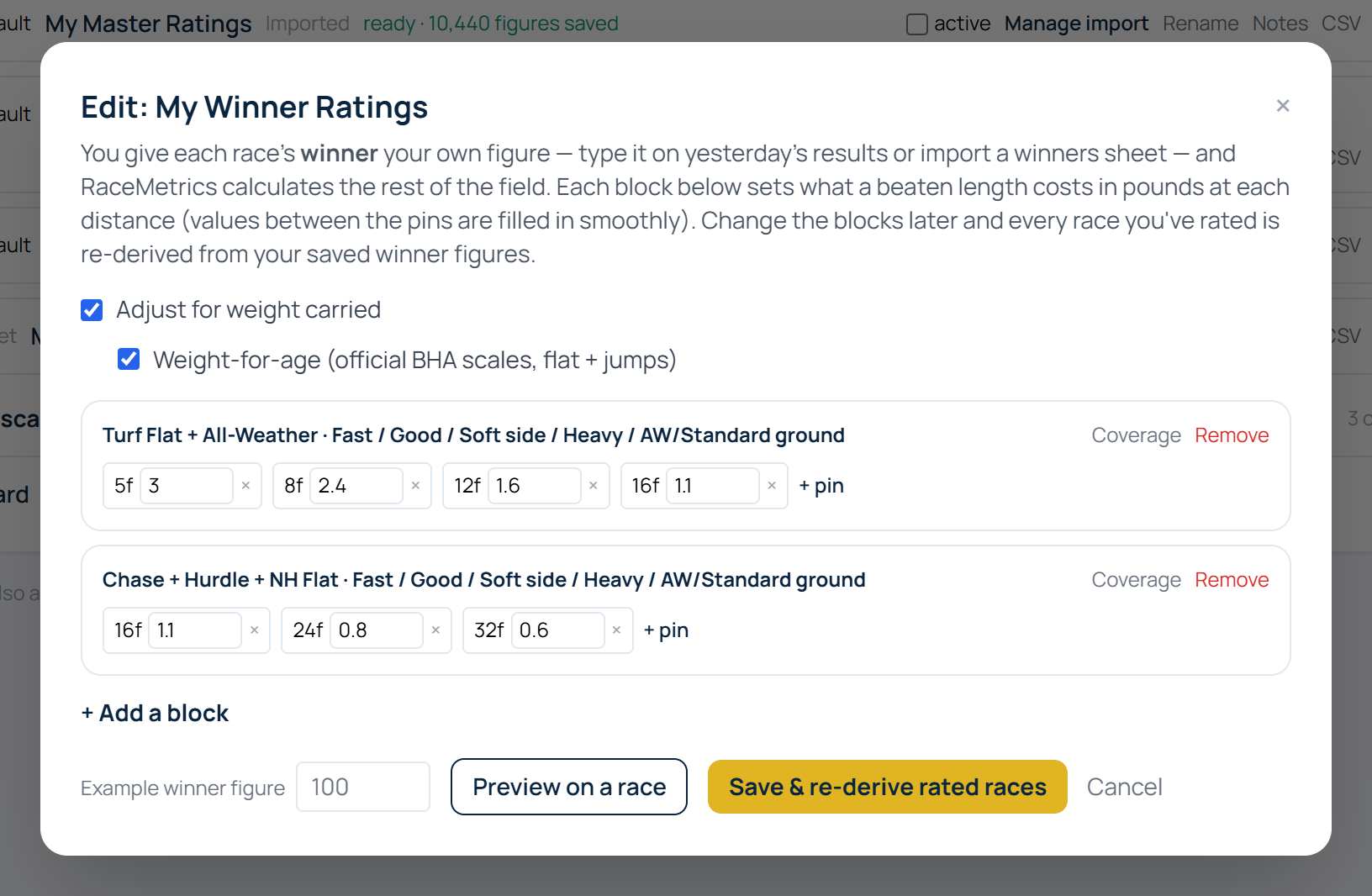
The scale stays yours to edit. Change a block and every race you have rated is re-derived from your saved winner figures. Weight-for-age is applied by default; if your winner figures already allow for the weight carried, untick that box and the weight step is left out rather than counted twice.
Back on the card, the My Last column shows each horse's actual last few figures from your set, oldest first, so a horse on the up looks different from a steady one. Your judgement, carried onto the card.
Bringing years of figures with you. A winners sheet (date, course, horse, your figure for the winner) imports back to January 2018, and every beaten horse in every one of those races is derived on your scale in a few minutes. From then on each morning's results are added for you.
Everything in one place
| What you keep | Where it lives | What happens to it |
|---|---|---|
| Your notes | Under each runner on My Card, and the My Notes tab on the horse's profile. One General note plus four race-type notes, up to 1,000 characters each. | Saved against the horse; shown on every card that horse appears on, from the day you write it. |
| Your prices | The My Odds column. Fraction or decimal in; shown as the fraction. | A running book total under the heading, reserves outside it until ticked in; saved as a set of their own. |
| Your ratings | The My Rating box on the card, or rate the winner in My Ratings and let the field be derived on your scale. | On every view, the My Last column, spreadsheet export, the Scorecard, review winners and System Builder back-tests. |
| Your history | A winners sheet (date, course, horse, figure) imported back to January 2018. | Every beaten horse in those races derived on your scale; each morning's results added for you. |
| Your devices | Any browser, one account. | The same card on your phone, tablet and desk. |
What you need
My Card and My Notes come with the Enterprise plan and above. Your own prices and ratings on the card, the running book, the Breeding tab's one-click note, rate-the-winner and the My Last column are part of RM Pro / Proform Premium, which includes everything below it. See what is included, and if you already have an account, open any racecard and switch to My Card.
FAQ
Can I bring the notes I already keep across?
Yes. Notes are typed straight onto the card or into the My Notes tab on the horse's profile, and copying and pasting them side by side is the quickest route. Each note is saved against the horse, so it appears on every card that horse runs in from then on. If your notes are in a spreadsheet, email support and we will help you load them.
Are my prices, ratings and notes visible to anyone else?
No. They are private to your account. They are not tips, they do not feed the RaceMetrics ratings or the RaceMetrics Model Price, and nobody else sees them.
Can I import years of my own winner figures?
Yes. A winners sheet with the date, course, horse and your figure for the winner imports back to January 2018. Every beaten horse in those races is then derived on your scale, and each morning's new results are added automatically.
Which subscription do I need?
My Card and My Notes are included from the Enterprise plan. Your own prices and ratings on the card, the book total, rate-the-winner and the My Last column are part of RM Pro / Proform Premium. Everything is saved to your account and works in any browser, on any device.
All screens in this article are from a live account on RaceMetrics, taken 2 September 2026. Help: typing odds, ratings and notes on the card, My Ratings, form lines and profiles.