
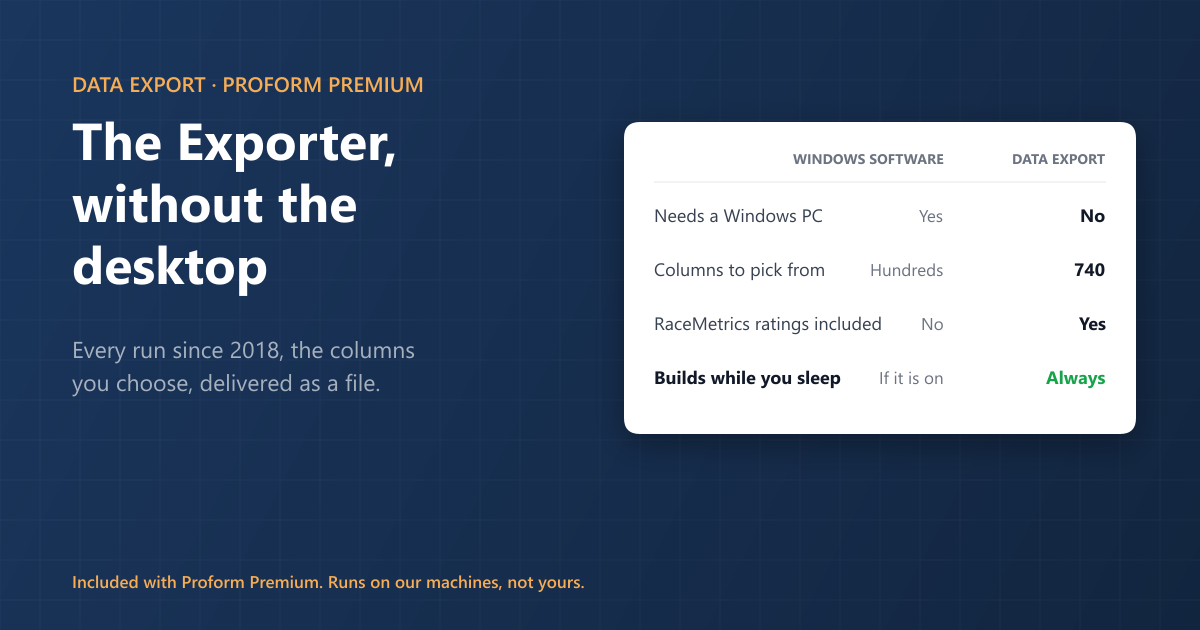
Every run since 2018, the columns you choose, built while you get on with something else and emailed to you as a file. No Windows machine, no install, no database to build.
In the first week of September four people asked us for data. One wanted every flat runner’s early price and starting price across a fortnight. One wanted 36,000 back-tested runs from a rating-rank test. One had just subscribed and went looking for the export button. One wanted everything since 2018 and a fresh file each day, and told us he did not own a Windows machine.
They are four versions of the same question, and until last week they had three different answers. Now they have one.
What it is
Data Export is on RaceMetrics, in your browser, and it is included with Proform Premium.
You name an export, set a date range from 1 January 2018 onwards, narrow it if you want by country, race type, course, handicap or class, and tick the columns you want from around 740, up to 150 in one file. Tick Include declared cards and you get results and every card already declared, up to two days ahead, in the same file. Press Estimate rows to see how big it will be, preview a day of it to check it is what you meant, then queue it.
Every file is one row per runner, and it can open with the date, off time, course, race, race type, card number and horse. A results file can add the finishing position, the number of runners, whether the horse won and whether it placed, the lengths it was beaten, the speed figure it earned, the starting price, the Betfair Starting Price and the Betfair place price. All of those are ticks like any other and none is ticked to start with, so take only the ones your spreadsheet wants. Then come your columns, grouped the way the System Builder groups its filters.
This is not new. Doing it without Windows is
Proform Premium has always included an exporter in the Windows software, and it is still there: race, runner and calculated fields by the hundred, tick-lists you can save and re-run, an export on a timer, and the sectional record furlong by furlong if you hold the add-on.
What it needs is a Windows PC on an Intel or AMD processor, an install, and a database built on your own machine before the first file exists. If you work on a Mac, on an ARM laptop, or you simply never wanted to install anything, that was the end of the conversation.
Data Export is the same job done from the page. It needs a browser and nothing else.
What the online one adds
It runs whether you are there or not. Save an export with Save and run daily and the files come to you: each day’s results once the morning processing has finished, and each declared card as it is published, about two days ahead, so Thursday’s card lands on Tuesday afternoon. One saved export gives you both. The timer in the Windows software does the same job, but it runs on your machine, which means your machine has to be on. This runs on ours.
The neat trick is to take the history once as an ordinary export, then save the same thing as a daily. Your archive stays current from then on without you touching it, and daily files do not count against your five exports a day.
The figures that only exist here. RaceMetrics ratings and their ranks, the RaceMetrics Model Price (RMP) and its rank, precomputed trainer and jockey form matched to today’s race, course, distance, going and class records, and the RaceMetrics Tip. None of that is in the desktop database, because it is calculated on the platform.
You can see it before you commit. Preview shows a whole day of your export with the columns you picked, so ranks read against complete fields rather than a handful of rows, and it costs nothing against your allowances. Any finished export reopens in the builder with its columns and filters intact.
What the Windows software still does better
Worth saying plainly.
It goes back to 1997 for Britain and 2009 for Ireland. Data Export starts at 2018, and there are more than two million runners before that date which only the software can reach.
It has no row limits, and the Direct Database Access that comes with Premium lets you query the whole database with anything that speaks to SQL Server: Excel, Python, whatever you use.
If either of those is what you need, the software is still the answer, and it is in the same subscription.
How long it takes
A day or two of racing comes back in seconds, ready on the page. Larger pulls run in the background and email you a link, and while one is waiting it tells you what it is waiting for and when it expects to start.
How long a big one takes depends far more on how many columns you pick than on how many rows you asked for. Four columns across 437,000 runners takes under five minutes. Nine columns across 433,000 takes under ten. Eighty columns across the whole million-row history takes a little over two hours. Pick what you need and it is quick.
Who gets it
| Free | Basic | Enterprise | RaceMetrics Pro | Proform Premium | |
|---|---|---|---|---|---|
| Price a month | £0 | £10 | £25 | £75 | £97.50 |
| Data Export | No | No | No | No | Yes |
| Rows per CSV button | 100 | 100 | 100 | 100 | 2,000 |
| Windows software and database | No | No | No | No | Yes |
Data Export is part of Proform Premium and is not included with RaceMetrics Pro. Premium also includes everything in RaceMetrics Pro, so nobody needs both. Compare the plans.
Sectional columns need the sectionals add-on, and it comes in two packages, both £50 a month. RaceMetrics Sectionals gives you all thirteen analysis tabs on screen, with nothing up front, and no sectional data leaves the site in a file. Full Sectionals, on Proform Premium, is the one that lets sectional data out: the sectional columns in your exports, the full section-by-section record of 849 columns, and sectional export from the Windows software. It is £50 a month with the first year, £600, paid up front by bank transfer. That year is the export licence and goes straight to Total Performance Data, who supply the raw timing and tracking. It covers the first twelve months, after which it is £50 a month and you can carry on, pay annually, or stop.
The limits, stated plainly
Files cover British and Irish racing from 1 January 2018. RaceMetrics ratings begin in 2023 and Model Prices in July 2026, so those columns are blank before then. Sectional coverage is British racing only and begins as each course joined, from about a fifth of British runners in 2018 to almost all of them from 2024. A blank cell means the figure was not recorded, never that it was zero.
Allowances are 1.2 million rows per export, 3 million in any 30 days, five exports a day and three full-history pulls a week. Download links last seven days and ten downloads, and you must be signed in on the account that asked for the file. It is for your own use.
Every file also carries RaceKey and RunnerKey, so a daily file joins onto your history perfectly. They are our own reference numbers, not Proform’s.
Frequently asked questions
Do I need the Windows software to use this?
No. Data Export runs in the browser on any device. The Windows software is still included with Proform Premium if you want the deeper history or direct database access.
Can I get yesterday’s results and today’s card in one file?
Yes. Tick Include declared cards on a results export, or save it as a daily and both arrive on their own each morning.
Can I get data from before 2018?
Not through Data Export. Britain from 1997 and Ireland from 2009 are in the Windows database, which comes with the same subscription.
Is it included with RaceMetrics Pro?
No, it is Proform Premium only. RaceMetrics Pro members get 100 rows from the CSV buttons around the site.
Can I export sectional data?
With the Full Sectionals package on Proform Premium, which is £50 a month with the first year, £600, paid up front. The on-screen package does not include export.